 MonTally docs
Troubleshooting
Solve installation, capture, monitor, profile, and PokeMMO sync issues in MonTally
Troubleshooting Guide
This page covers the most common issues MonTally users run into and explains what they usually mean.
The goal is not just to give quick fixes, but to help you understand why a problem happens so it is easier to avoid next time.
Installation and Platform Warnings
Windows Security Warning
When installing MonTally on Windows, you may see a SmartScreen warning because the app is not code-signed.
This does not automatically mean the app is malicious.
What to Do
- When you see "Windows protected your PC"
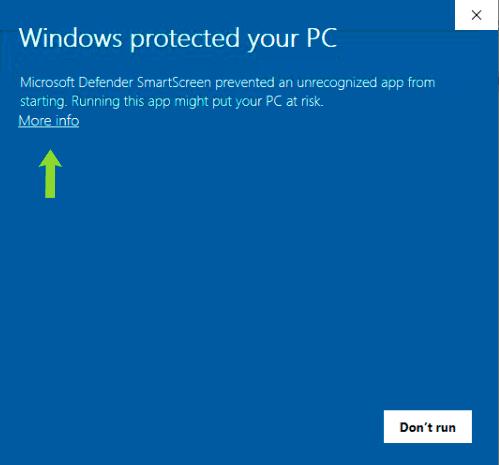
- Click More info
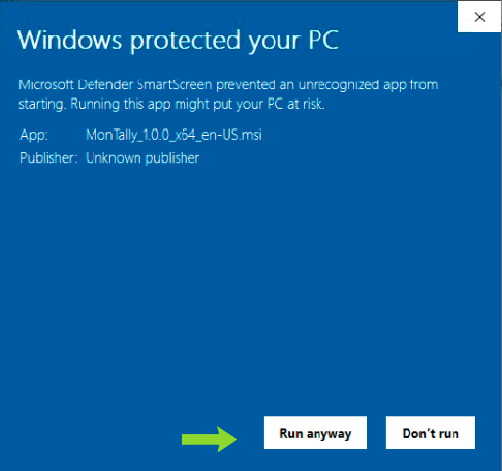
- Click Run anyway
macOS Security Warning
If macOS says MonTally is damaged or refuses to open it, the most common cause is Gatekeeper blocking an unsigned app.
What to Do
- Open the downloaded
.dmg - Drag
MonTally.appintoApplications - Try opening it with right-click ->
Open - If macOS still blocks it, run:
- Open the app again from
Applications
Linux AppImage Does Not Launch
The most common Linux issue is missing execute permission.
What to Do
Run:
Detection Problems
MonTally Is Not Detecting Pokémon Correctly
This is usually a capture-area issue, not a broken database or broken UI.
Check the following:
- the capture area includes the actual encounter text region
- the game is on the same monitor the area was configured for
- the game window has not moved since calibration
- overlays are not covering the relevant text
- your game UI is stable and readable
If in doubt:
- open Settings
- use Select Capture Area
- save a fresh capture region
Multi-Monitor Problems
MonTally supports multiple monitors, but the capture area must belong to the display where the game is running.
Symptoms
- detection works on one screen but not another
- detection broke after moving the game window
- capture appears offset
Fix
- move the game to its final monitor
- reopen Select Capture Area
- save the area again
MonTally stores a monitorIndex, so moving the game without recalibrating often causes the wrong screen to be captured.
Important Limitation
Avoid stretching the game across multiple displays. MonTally is much more reliable when the game remains fully inside one monitor.
Counter Accuracy Problems
The Counter Misses Encounters
Usually caused by:
- weak capture alignment
- a capture area that is too small
- hidden or obstructed text
- a fast-changing UI that the current capture does not read cleanly
The Counter Reads the Wrong Pokémon
Usually caused by:
- too large a capture area
- irrelevant UI elements inside the capture region
- low contrast or noisy backgrounds
The Counter Looks Delayed
Usually caused by:
- a larger-than-needed capture region
- high system load
- more aggressive display scaling setups
You can try Turbo mode if you need faster reads, but only after checking that the capture area itself is well configured.
PokeMMO Integration Problems
Connect Button Never Becomes Ready
Usually caused by:
- not using a PokeMMO profile
- PokeMMO not launched through MonTally when the integration expects reconnection
- the game not fully loaded yet
Connected but Sync Is Disabled
Usually caused by:
- you are not yet inside the game world
- the current PokeMMO tracker state has no entries available yet
- the profile is not the expected PokeMMO profile
Wait until the character is loaded in game, then try Sync with PokeMMO again.
MonTally Cannot Find PokeMMO
Usually caused by:
- a non-standard install path
- missing installation
- missing access to the expected runtime or launch files
MonTally Cannot Launch PokeMMO
Usually caused by:
- missing bundled runtime
- missing or invalid Java
- a bad game path
Recommended fix:
- install Java 21 SDK
- use the official Oracle JDK 21 download page: https://www.oracle.com/java/technologies/downloads/#java21
- on Windows, choose the Windows x64 Installer
Read more in PokeMMO Integration.
Java Questions
Does MonTally Work With Any Java Version?
Not literally any Java.
For PokeMMO integration, MonTally tries to use:
- a configured Java path
- PokeMMO bundled runtime
JAVA_HOME- system Java on
PATH
So the runtime needs to be one that can actually launch the PokeMMO client correctly. In practice, Java 21 SDK is the safest recommendation to avoid startup problems.
If standard OCR tracking is your only use case, Java is much less relevant.
Profile Problems
The Wrong Profile Is Updating
Usually caused by:
- manual profile selection not matching your current workflow
- auto game profile switching being disabled
- confusing the default profile with a game-specific profile
PokeMMO Data Is Mixing With Normal Tracking
Usually caused by:
- using the default profile instead of a dedicated PokeMMO profile
- importing data into the wrong active profile
Use separate profiles to keep workflows clean.
Import and Export Problems
Imported Settings Do Not Feel Right
Usually caused by:
- restoring a setup from a different monitor layout
- importing a capture area saved on another machine
If the UI imports correctly but detection feels wrong, recalibrate the capture area instead of assuming the import is broken.
Imported Encounter Data Looks Wrong
Usually caused by:
- restoring the wrong file
- mixing old data with a different current profile workflow
- confusing current snapshot data with persistent data
Performance Problems
MonTally Feels Slow
Try these in order:
- reduce the capture area to the smallest useful region
- close unnecessary background apps
- test Turbo mode
- keep the game on one monitor and in a stable position
UI Feels Too Large or Too Small
Relevant settings include:
- small UI
- dynamic size system
- streamer mode
These affect presentation, not the raw tracker logic.
Recommended Recovery Flow
If you are unsure where a problem comes from, this is the best reset sequence:
- confirm the correct profile is active
- confirm the game is on the expected monitor
- save the capture area again
- relaunch MonTally if needed
- if using PokeMMO, reconnect and wait until the character loads
Getting Better Help
If you still need support, include:
- MonTally version
- operating system
- game used
- whether you are using OCR or PokeMMO integration
- whether the issue happens on one monitor or multiple
- screenshots or a short explanation of your setup